Built for Multicam Directors

The Ultimate Director's Plot Tool

Design overhead camera plots in minutes, not hours. Visualize FOV, animate movement paths, share with your crew — all from one tool built for the way directors actually work.

Free trial — cancel anytime.
Now on Mac too: Download the Mac app
Also on iPhone & iPad: Get it on the App Store
Used on productions you know
ABC The Bachelorette
Hulu Project Runway
Amazon American Gladiators
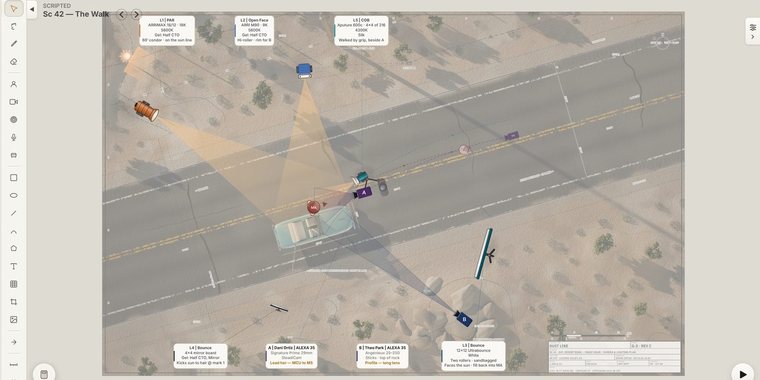
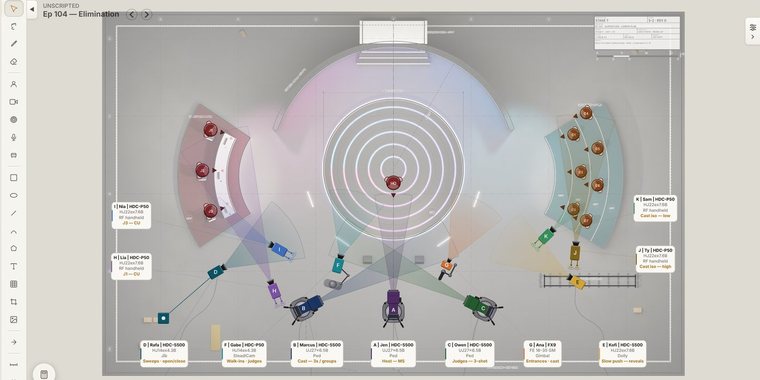
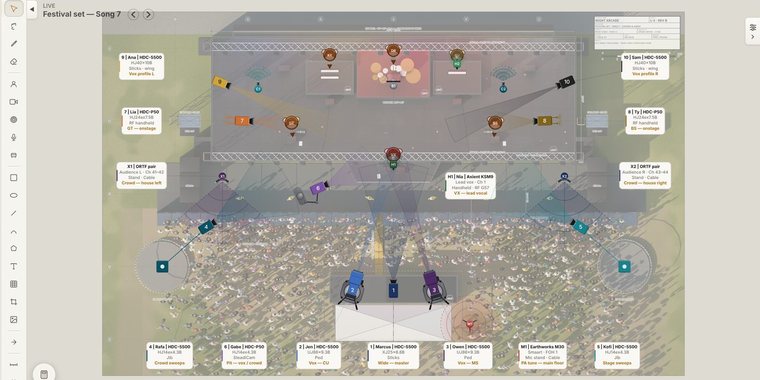
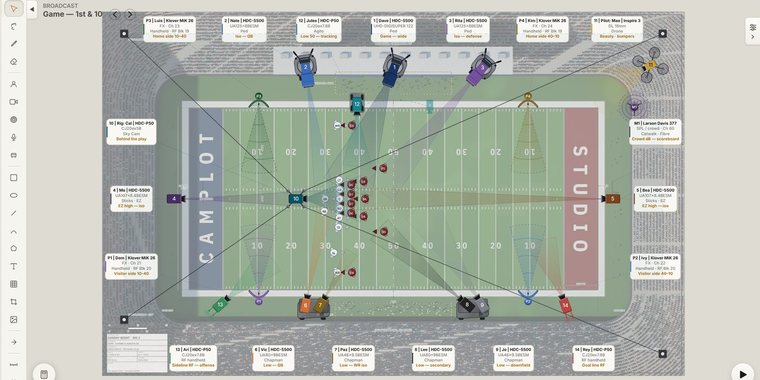
CamPlot on Mac — multicam overhead plot with cameras, subjects, FOV cones, and movement paths
CamPlot on iPad — plotting cameras over an imported ground plan
CamPlot on iPhone — the same project, live on a phone
The same project, everywhere you work — Mac · iPad · iPhone · Windows · Android
Designed by a multi Emmy Award-winning, DGA multicam director with over two decades of experience — because no tool existed that was actually built for what directors do every day.
Everything You Need to Plot

Stop forcing PowerPoint and Keynote to do what they were never designed for.

Creator for the person building the plots View+ crew upgrade — included with Creator Free in every account, free ones too
Plotting

Build your overhead plot exactly the way directors think — cameras, subjects, fields of view, scaled measurements, and blocking.

Creator
Camera & Subject Plotting
Place cameras and subjects on your overhead plot with a single tap. Tag, color-code, and label each camera with type, operator, lens, support, and shot type.
Creator
Lens FOV Visualization
See exactly what each camera covers. Set focal length in mm, toggle between Full Frame and Super 35, and extend the FOV cone to visualize coverage at distance — with live readouts of your exact frame width while you drag.
Creator
Camera Lock on Subject
Lock any camera's angle onto a subject with one tap. Move the camera or the subject anywhere on your plot — the camera's facing angle automatically tracks the subject. Shot details auto-fill as "initials + single" and stay editable.
Creator
Ground Plans Library
Import the ground plan from your art director or production designer and scale it to real-life dimensions. Choose from your library of ground plans when building a plot, then work over an accurate background that reflects the actual set.
Creator
Scale & Measure
Set a scale reference and measure real distances on your plot in feet and inches. FOV distance readouts update automatically when a scale is set.
Creator
Movement Paths
Plot camera and subject movement with multi-point paths — one-way, loop, or bounce playback. Save a lens and facing per position so cameras zoom and rotate as they travel. Hit play and watch your blocking come alive.
Creator
Jib & Dolly Modes
Put a camera on an arm or on rails. Jib Mode draws the reach arc — standard or telescoping — and keeps the camera on the arm as it sweeps; Dolly Mode lays straight or curved track and keeps the camera riding it. Both animate base and track moves, so your plans reflect what the rig can physically do.
Creator
Lighting
Drop lights directly onto your plot — Fresnel, panel, tube, sun. Each light has its own throw, spread, color temperature, and tint. Visualize where the light lands so you can plan grip, gels, and exposure before you walk on set.
Director's Toolkit

Field tools for scouts and shoot days — see the shot through real glass, track the sun, and run the numbers every cinematographer needs, right from your phone. Every account can open these tools; View+ and Creator unlock every camera, lens and setting in them.

View+
Director's Viewfinder
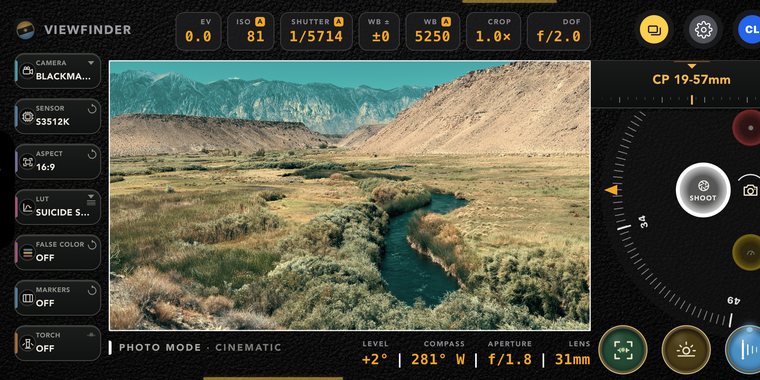
Hold up your iPhone and see the shot through the real camera. Pick the body — Alexa, FX6, Komodo, Ronin 4D — dial any focal length on a zoom wheel, add frame lines, and grade the image live with true 3D LUTs — a library of more than 120 cinema looks built in, plus four slots for your own .cube files. Save scout frames straight onto the camera on your plot; full-quality copies land in your Photos. See all five modes →
View+
Sun Seeker
Right inside the viewfinder: see the sun's path drawn over your framed shot — today's or any future date's — using your exact location and the compass. A soft sun rides the arc wherever you point and tilt the camera, telling you the exact time the real sun will be in that spot. Golden hour planning while you're still scouting.
View+
LUT Library & Export
A massive LUT library ships with the viewfinder — more than 120 cinema looks in nine packs (Movie Inspired, Filmic, Vintage, Contemporary, Expedition, Avant-Garde, Vibrant, Single-Tone, Influencers), searchable, applied live on the GPU as you frame. Every look is on the LUT dial itself, shelf by shelf — touch and hold and a reel comes out under your finger: up and down through the looks, left and right through the shelves, with the picture regrading live at every stop. A favourites shelf holds up to ten for the ones you shoot with. Then export any look for the camera you're actually shooting — pick S-Log3, LogC4, C-Log3, V-Log, N-Log, Log3G10, Apple Log and 11 more, and CamPlot composes the manufacturer's own log→709 conversion underneath the look and hands you one .cube. Load it into the camera or the DIT cart and the image on the monitor is the image you saw on your phone.
View+
Media Calculator
How many hours fit on which card? Pick a camera, recording format, frame rate, and card size — CamPlot shows the media that camera actually shoots on and exactly how much record time you get, from manufacturers' published data rates for dozens of cameras.
View+
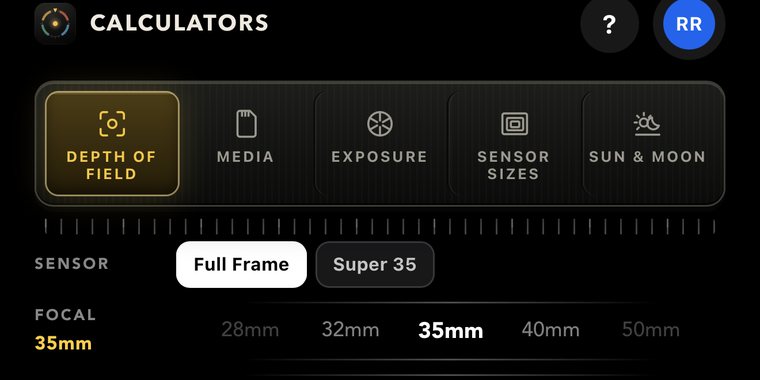
Depth of Field Calculator
Roll focal length, aperture, and subject distance and watch near limit, far limit, total depth, and hyperfocal update live — with a photographic preview where the subject and a real scene sharpen and melt exactly as the math says they would.
View+
Exposure Calculator
Four camera gears — ISO, aperture (f or T stops), shutter angle or speed, and ND (variable, hard, or stops). Lock all but one and roll any dial: the free gear visibly rolls to the value that holds your exposure, in exact 1/3-stop steps.
View+
Sensor Size Chart
Overlay up to three cameras' sensors to scale — see exactly how an Alexa 65 towers over a Super 35 chip, with widths, heights, and diagonals read out for every body in the list.
Composition

Build the world around your cameras — sets, props, photos, text, and freehand annotations — then organize everything into layers you can hide or lock.

Creator
Set Elements
A library of 30 set pieces — chairs, sofas, tables, beds, doors, windows, kitchen and bathroom fixtures, cars, trees — all sized to real-world inches and ready to drop, scale, and rotate to match the actual set.
Creator
Pictures & Cropping
Drop reference photos straight onto the plot — talent shots, location stills, mood references. Crop in-place with rule-of-thirds guides, lock proportions while you resize, and reset to original anytime.
Creator
Text, Shapes & Bubbles
Type labels, callouts, and notes directly on the plot. Choose from 8 text-box shapes — rectangle, ellipse, hexagon, diamond, star — and pick a typeface from the system or load custom fonts from your own folder.
Creator
Pen & Annotations
Draw freehand strokes with the pen tool to call out a path, mark a hot zone, or sketch in a quick note. Erase what you don't need with a tap. Annotations live on their own layer so you can hide them before exporting a clean version.
Creator
Layers
Seven built-in layers — Ground Plan, Set, Pictures, Subjects, Lights, Cameras, Annotations. Hide a layer to focus, lock it to keep it from getting bumped, or export with only the layers you want visible. Per-setup, per-device.
Projects Workflow

Built around how a multicam production actually runs — multiple setups per project, consistent rosters, and reports you can hand off.

Creator
Multi-Setup Projects
Organize your project with multiple setups — intros, eliminations, finales — all in one project. Drag to reorder. Hide setups that aren't ready to share.
Creator
Operator Roster
Assign operators and camera types to each camera letter once per project. Every camera you place auto-fills with the right operator and rig — across every setup.
Creator
Inventory
Track the cameras, lenses, and support gear you actually have. CamPlot counts what your setups use — simultaneous setups add together — and warns you the moment the plan calls for more gear than the truck carries.
Free
Camera Report
Generate a complete camera report from your plot — camera tags, lenses, support, operators, and shot types — sorted and ready to print or share. Setup to setup, lens and support changes are highlighted automatically so operators see exactly what changed. Every crew member you share the show with can open the live report themselves, free.
Collaboration & Sharing

CamPlot is built for the whole crew — live updates the moment you make a change, edit access for the people you trust, and private markup for everyone else.

Creator
Crew Sharing
Share a link and the entire crew sees the plot — live. Every change you make appears on their screens the moment you make it, over a real-time connection. No account setup, no downloads, free for viewers.
Creator
Live Collaboration
Give your AD or a fellow director full edit access. Collaborators work directly on the project while you see a change log of every editing session — and you can undo an entire session with one tap.
View+
Crew Markup & Notes
Operators and crew on View+ can draw and keep notes right on any shared plot — positions, cable runs, reminders — without ever touching the actual plot. Their markup is private to them and follows them across devices.
Creator
Notify the Crew
Changed the plot an hour before rehearsal? Hit Notify — CamPlot writes a summary of exactly what changed in each setup and sends it to your whole crew as a push notification on their devices.
View+
Export & Print
Export any setup as PDF or JPEG — properly formatted for landscape or portrait. Export an entire project as a multi-page PDF. Cloud-saved and synced.
Creator
Cloud Save & Backup
Every change saves to the cloud automatically. Daily rolling backups keep 10 days of history — restore any version with a tap if anything goes wrong.
Install & Access

Install CamPlot on any device you work on — and keep plotting even when you lose signal.

Free
Install on Any Device
A true native Mac app, a native app for iPhone & iPad, plus installable apps on Android, Chrome, and Edge. Opens fullscreen, loads instantly, and keeps working offline — your changes sync the moment you're back online.
Free
Works on Any Device
Built for iPad, laptop, and desktop. Touch-friendly with pinch-to-zoom, drag-to-pan, and tap-to-place. Your crew views plots on their phones.
The whole Director's Toolkit, in your pocket

A real viewfinder and the four calculators you'd otherwise be working out on paper — on set, on a scout, or in the truck. Included with View+ and Creator.

CamPlot Director's Viewfinder on iPhone — framed shot with the sun path drawn over it
Director's Viewfinder — pick the camera body, roll to any lens, grade it from a library of 120+ looks, and watch today's sun path cross the frame.
Explore the Director's Viewfinder →
Media calculator showing record time for a 512GB card
MediaHow many hours fit on the card
Depth of field calculator with a photographic preview
Depth of FieldWatch the focus fall off before you shoot
Exposure calculator with ISO, aperture, shutter and ND gears
ExposureLock three dials, roll the fourth
Sensor size chart comparing three camera sensors to scale
Sensor SizesAny three bodies, drawn to scale
"I spent years plotting cameras in Keynote — forcing a presentation tool to do something it was never built for. CamPlot does in minutes what used to take me hours."
— Multi Emmy Award-Winning DGA Multicam Director

Simple Pricing

One plan for the director. A free seat for every crew member — and an upgrade for the ones who want the field tools too.

View+
$29.99/year
For the crew who want the director's field tools in their own pocket.
  • Everything in View Only
  • The full Director's Viewfinder & Sun Seeker
  • All four Calculators, unlocked
  • Private markup & notes on shared plots
  • PDF export of plots & camera reports
or $3.99/month · cancel anytime
Crew / View Only
Free forever
For everyone the plots are shared with — operators, ADs, producers.
  • View shared projects, live as they change
  • Live camera & inventory reports
  • Push notifications when plots change
  • Viewfinder & Calculators, in preview form
  • No credit card, ever
Just open the link your director sends you.

Common Questions

Does CamPlot work on iPad?
Yes — CamPlot is built touch-first for iPad, including Apple Pencil support for drawing and handwriting on plots. It also works on Mac, Windows, Android, and phones, and installs as an app on all of them.
Is there a Mac app?
Yes — a true native Mac app, signed and notarized by Apple. Download CamPlot.dmg, drag it into Applications, and it opens like any Mac app: its own window and Dock icon, a real menu bar, and full offline support — launch it with no internet and your shows are there. It's always up to date automatically, and it's free to download (sign in with your CamPlot account).
Is there an iPhone & iPad app?
Yes — CamPlot is on the App Store, free to download (sign in with your CamPlot account). It also includes the Director's Viewfinder and Calculators built in. If you've been opening the web app on your Home Screen, the App Store version replaces it — same account, same shows.
Does my crew have to pay?
No. Anyone you share a show with views it free, forever — including live updates as you change the plot, the live camera and inventory reports, and push notifications when something moves. Only the person creating plots needs a Creator plan. Crew who want private markup on the plot, PDF export, or the full field tools can add View+ for themselves — but nobody has to.
What is View+?
View+ is an optional upgrade for crew, at $29.99 a year or $3.99 a month. It keeps everything free viewing gives you and adds the tools that are useful in your own hands: the full Director's Viewfinder with the Sun Seeker, all four Calculators unlocked, private markup and notes on any plot you've been shared, and PDF export of plots and camera reports. Free accounts can still open the Viewfinder and Calculators — they're just fixed to one demo camera and setting. Every Creator plan includes View+ already.
Does it work without internet?
Yes. Install CamPlot on your device and it opens and works offline — in the truck, in the arena, wherever. Your changes sync to the cloud the moment you're back online.
Can I use my production designer's ground plans?
Yes — import ground plans as images or PDFs, scale them to real-world dimensions, and build your plot on top. Your ground plan library is saved per project, and measurements on the plot read out in real feet and inches.
What happens when my trial ends?
Your work is never deleted. If you don't subscribe, your account becomes view-only until you do — every project and plot is right where you left it.
How do payments work?
Billing is handled securely by Stripe. You can switch between monthly and annual, or cancel anytime, right from your account — no emails, no phone calls.

Ready to Plot?

Join directors who've stopped wrestling with the wrong tools.

Free trial — cancel anytime.